


Attn: Computer Builders


Thread Starter
Senior Member
Joined: Apr 2001
Posts: 8,232
Likes: 0
From: Concord, NC
 Attn: Computer Builders
I need some assistance here. I have recently come into ownership of a basic PCU that I am going to strictly use for working online. I will be needing some accessories, such as a keyboard, mouse, even a monitor.
My first question is, where's a good place to get decent quality for a low price? I've seen some magazines before were this equipment was dirt cheap and people bought it to build their own computers, but I don't know where those are.
My second question is that I need to hook up to the internet. Currently we have one cable modem coming into the apartment. There are no network cards in the computer. Tell me everything I need to do this, both software and hardware.
Thank you!
My first question is, where's a good place to get decent quality for a low price? I've seen some magazines before were this equipment was dirt cheap and people bought it to build their own computers, but I don't know where those are.
My second question is that I need to hook up to the internet. Currently we have one cable modem coming into the apartment. There are no network cards in the computer. Tell me everything I need to do this, both software and hardware.
Thank you!

I go duffy on dem bitches
Joined: Mar 2001
Posts: 28,248
Likes: 0
From: Gonzales, Louisiana
$14 - Keyboard & Mouse
http://www.newegg.com/app/ViewProduc...alog=63&depa=0
$11 - Network Adapter
http://www.newegg.com/app/ViewProduc...alog=27&depa=0
I suggest this router: You can go wired or wireless and setup is a piece of cake either way.
http://www.newegg.com/app/viewProduc...127-125&depa=0
Wireless USB Adapter
http://www.newegg.com/app/ViewProduc...=BROWSE&depa=0
 h:
h:
http://www.newegg.com/app/ViewProduc...alog=63&depa=0
$11 - Network Adapter
http://www.newegg.com/app/ViewProduc...alog=27&depa=0
I suggest this router: You can go wired or wireless and setup is a piece of cake either way.
http://www.newegg.com/app/viewProduc...127-125&depa=0
Wireless USB Adapter
http://www.newegg.com/app/ViewProduc...=BROWSE&depa=0
h:

Registered User
Joined: Nov 2000
Posts: 2,715
Likes: 1
From: Virginia (Besieged)
The reason I go w/Linksys wireless is because the remote computers have adapters that are on USB cables, and the receiving unit can be moved around a little bit for a better signal.
In my experience, despite all the advances, wireless is still occasionally very buggy. You should buy the router and remote units from the same manufacturer, at the same time, to make sure you have the same compatible technology.
I know wireless is supposed to be the end all and be all of modern computing, but in my experience it can be very buggy, especially in some of those ancient houses we have here in Virginia (1600 AD) and England (1100 AD), houses which have God-only-knows-whatever substance in the construction blocking the signals.
Linksys also sells a booster that helps with difficult signal situations. At Fort Belvoir, we had one computer that was two stories up from the router, and we could only get it to work 100% of the time when we had the booster connected.
In my experience, despite all the advances, wireless is still occasionally very buggy. You should buy the router and remote units from the same manufacturer, at the same time, to make sure you have the same compatible technology.
I know wireless is supposed to be the end all and be all of modern computing, but in my experience it can be very buggy, especially in some of those ancient houses we have here in Virginia (1600 AD) and England (1100 AD), houses which have God-only-knows-whatever substance in the construction blocking the signals.
Linksys also sells a booster that helps with difficult signal situations. At Fort Belvoir, we had one computer that was two stories up from the router, and we could only get it to work 100% of the time when we had the booster connected.
I go duffy on dem bitches
Joined: Mar 2001
Posts: 28,248
Likes: 0
From: Gonzales, Louisiana
Originally Posted by George Knighton
The reason I go w/Linksys wireless is because the remote computers have adapters that are on USB cables, and the receiving unit can be moved around a little bit for a better signal.
In my experience, despite all the advances, wireless is still occasionally very buggy. You should buy the router and remote units from the same manufacturer, at the same time, to make sure you have the same compatible technology.
I know wireless is supposed to be the end all and be all of modern computing, but in my experience it can be very buggy, especially in some of those ancient houses we have here in Virginia (1600 AD) and England (1100 AD), houses which have God-only-knows-whatever substance in the construction blocking the signals.
Linksys also sells a booster that helps with difficult signal situations. At Fort Belvoir, we had one computer that was two stories up from the router, and we could only get it to work 100% of the time when we had the booster connected.
In my experience, despite all the advances, wireless is still occasionally very buggy. You should buy the router and remote units from the same manufacturer, at the same time, to make sure you have the same compatible technology.
I know wireless is supposed to be the end all and be all of modern computing, but in my experience it can be very buggy, especially in some of those ancient houses we have here in Virginia (1600 AD) and England (1100 AD), houses which have God-only-knows-whatever substance in the construction blocking the signals.
Linksys also sells a booster that helps with difficult signal situations. At Fort Belvoir, we had one computer that was two stories up from the router, and we could only get it to work 100% of the time when we had the booster connected.
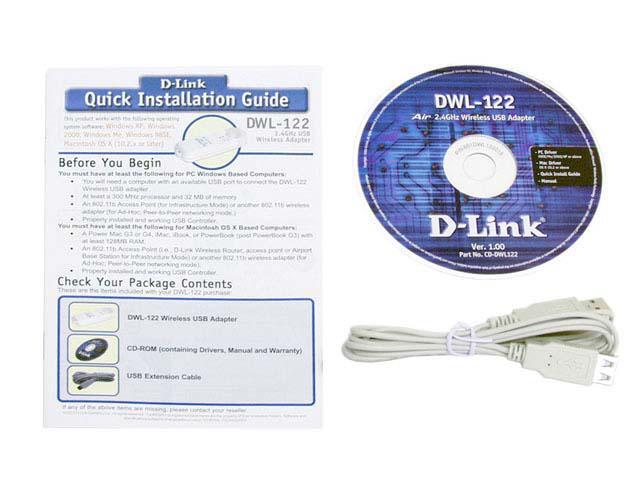
What i failed to mention about the USB adapter i posted is that it comes with about a 4 foot usb extention so that you can, as you're describing, move the receiving unit. It's not pictured but rest assured it's there as I own both of those pieces of equipment.
Edit (See below):

Registered User
Joined: Nov 2000
Posts: 2,715
Likes: 1
From: Virginia (Besieged)
That's what we just finished doing out here in the country. No idea what was in these walls out here, but it just wouldn't work 100% of the time. And it was 1/2 the distance that exactly the same setup was working up three flights of stairs at Fort Belvoir.
Never will figure it out, I guess.
Never will figure it out, I guess.
Thread Starter
Senior Member
Joined: Apr 2001
Posts: 8,232
Likes: 0
From: Concord, NC
Ok, so some of this is complete gibberish to me. I'm not following what exactly it is that I need. Do I need the network adapter and wireless adapter? Please break down each setup I could potentially have and what equipment I'd need to do it with. I guess I have to be a newbie about somethings...:dunno:
I guess I have to be a newbie about somethings...:dunno:
I go duffy on dem bitches
Joined: Mar 2001
Posts: 28,248
Likes: 0
From: Gonzales, Louisiana
You'd want the usb adapter or the pci adapter, depending on how far away from the router you are and whether you want to run a wire or not.
and yes, george, usb >>>> pci for wireless purposes
if its any indication of quality, i have my wireless usb adapter at my in-laws house next door and its showing a "low" signal but i did a speed test and was still able to get 2.5mbps download.
and yes, george, usb >>>> pci for wireless purposes
if its any indication of quality, i have my wireless usb adapter at my in-laws house next door and its showing a "low" signal but i did a speed test and was still able to get 2.5mbps download.
