


computer builders, I'm a noob. Halp.



Thread Starter
#CustomUserTitle
Joined: Mar 2002
Posts: 63,855
Likes: 1
From: glass case of emotion

It's alive. For full specs and final pricing, see the first post.
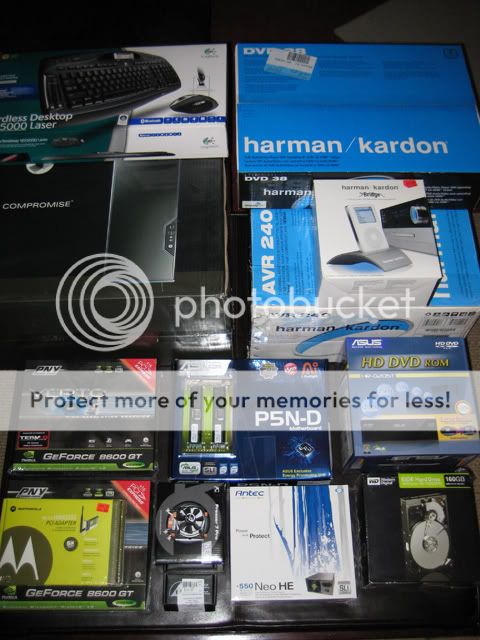
I matched the 45nm quad with an Asus SLi board. The only trouble I had was the shipped bios was not ready for this chip. I had to upgrade / flash the mobo, which I've never done before.
1. download the new bios from Asus
2. reformat a spare USB jump drive
3. unzip Asus bios, drag 2 files out and onto USB drive
4. start up the system, go into the system bios screen
5. Tools > EZFlash > update
After that, the chip fired right up. Windows XP installed in 25 minutes and I was able to configure the SLi shortly after.
The hardest part of this entire install was figuring out the Antec case. I've NEVER used something this well built and thought through. There were no instructions, so I sat there dropping clips and sorting screws until midnight. (started at 10pm)
The last things I need to do are:
1. install apps (Norton's, Adobe CS, MS Office, etc)
2. install the wireless card
3. install the Bluetooth keyboard
4. strip the old PC of extra components (2 SATA HDD's, 1 DVD-R)
5. setup the Harmon Kardon crap
6. run the mobo's optical audio out to the home theater
7. run the video card's DVI output to the TV's HDMI input
I matched the 45nm quad with an Asus SLi board. The only trouble I had was the shipped bios was not ready for this chip. I had to upgrade / flash the mobo, which I've never done before.
1. download the new bios from Asus
2. reformat a spare USB jump drive
3. unzip Asus bios, drag 2 files out and onto USB drive
4. start up the system, go into the system bios screen
5. Tools > EZFlash > update
After that, the chip fired right up. Windows XP installed in 25 minutes and I was able to configure the SLi shortly after.
The hardest part of this entire install was figuring out the Antec case. I've NEVER used something this well built and thought through. There were no instructions, so I sat there dropping clips and sorting screws until midnight. (started at 10pm)
The last things I need to do are:
1. install apps (Norton's, Adobe CS, MS Office, etc)
2. install the wireless card
3. install the Bluetooth keyboard
4. strip the old PC of extra components (2 SATA HDD's, 1 DVD-R)
5. setup the Harmon Kardon crap
6. run the mobo's optical audio out to the home theater
7. run the video card's DVI output to the TV's HDMI input
Last edited by e3NiNe; Apr 18, 2008 at 05:13 AM.



Thread Starter
#CustomUserTitle
Joined: Mar 2002
Posts: 63,855
Likes: 1
From: glass case of emotion
I haven't built a system up from scratch since August of 2004. It was good to catch up on the terminology ("SLI", "PCI-E", "DDR3", "L2", "latency", etc).

BAZINGA!
Joined: Aug 2004
Posts: 21,613
Likes: 0
From: San Diego, CA
It's alive. For full specs and final pricing, see the first post.
I matched the 45nm quad with an Asus SLi board. The only trouble I had was the shipped bios was not ready for this chip. I had to upgrade / flash the mobo, which I've never done before.
1. download the new bios from Asus
2. reformat a spare USB jump drive
3. unzip Asus bios, drag 2 files out and onto USB drive
4. start up the system, go into the system bios screen
5. Tools > EZFlash > update
After that, the chip fired right up. Windows XP installed in 25 minutes and I was able to configure the SLi shortly after.
The hardest part of this entire install was figuring out the Antec case. I've NEVER used something this well built and thought through. There were no instructions, so I sat there dropping clips and sorting screws until midnight. (started at 10pm)
The last things I need to do are:
1. install apps (Norton's, Adobe CS, MS Office, etc)
2. install the wireless card
3. install the Bluetooth keyboard
4. strip the old PC of extra components (2 SATA HDD's, 1 DVD-R)
5. setup the Harmon Kardon crap
6. run the mobo's optical audio out to the home theater
7. run the video card's DVI output to the TV's HDMI input
I matched the 45nm quad with an Asus SLi board. The only trouble I had was the shipped bios was not ready for this chip. I had to upgrade / flash the mobo, which I've never done before.
1. download the new bios from Asus
2. reformat a spare USB jump drive
3. unzip Asus bios, drag 2 files out and onto USB drive
4. start up the system, go into the system bios screen
5. Tools > EZFlash > update
After that, the chip fired right up. Windows XP installed in 25 minutes and I was able to configure the SLi shortly after.
The hardest part of this entire install was figuring out the Antec case. I've NEVER used something this well built and thought through. There were no instructions, so I sat there dropping clips and sorting screws until midnight. (started at 10pm)
The last things I need to do are:
1. install apps (Norton's, Adobe CS, MS Office, etc)
2. install the wireless card
3. install the Bluetooth keyboard
4. strip the old PC of extra components (2 SATA HDD's, 1 DVD-R)
5. setup the Harmon Kardon crap
6. run the mobo's optical audio out to the home theater
7. run the video card's DVI output to the TV's HDMI input
What's the total build cost? Why not run a VGA from the computer to the Olevia? That's what I did.
Thread Starter
#CustomUserTitle
Joined: Mar 2002
Posts: 63,855
Likes: 1
From: glass case of emotion
:chuckles: it was $10 with the purchase of an ASUS mobo @ Newegg. :thumbup:
It's a killer DVD-Rom too. I installed windows with it. h:
h:
First post should have all the details. I think it was $750-ish? (can't remember)
I might end up doing that. I want to keep everything digital with this box though. The audio out will even be optical too.
My current machine is utilizing the VGA + RCA input on the Olevia. If I end up missing the PC audio through the TV, I'll go back. Otherwise, I have a set of 360 VGA cables waiting for that input to open up.
It's a killer DVD-Rom too. I installed windows with it.
h:First post should have all the details. I think it was $750-ish? (can't remember)
My current machine is utilizing the VGA + RCA input on the Olevia. If I end up missing the PC audio through the TV, I'll go back. Otherwise, I have a set of 360 VGA cables waiting for that input to open up.
BAZINGA!
Joined: Aug 2004
Posts: 21,613
Likes: 0
From: San Diego, CA
Damn. Dell just had a deal with a quad core, 24" monitor, DVD burner and some more for like $600.
* Intel Core 2 Quad Processor Q6600 (8MB L2 cache,2.4GHz,1066FSB)
* Genuine Windows Vista Home Basic - English
* 1GB Dual Channel DDR2 SDRAM at 667MHz- 2DIMMs
* Dell USB Keyboard and Dell Optical USB Mouse
* 24 inch E248WFP Entry Widescreen Digital Flat Panel Monitor
* Integrated Intel Graphics Media Accelerator 3100
* 250GB Serial ATA Hard Drive (7200RPM) w/DataBurst Cache
* Integrated 10/100 Ethernet
* 56K PCI Data Fax Modem
* 16X DVD+/-RW Drive
* Integrated 7.1 Channel Audio
* 1Yr In-Home Service, Parts + Labor, 24x7 Phone Support
* Intel Core 2 Quad Processor Q6600 (8MB L2 cache,2.4GHz,1066FSB)
* Genuine Windows Vista Home Basic - English
* 1GB Dual Channel DDR2 SDRAM at 667MHz- 2DIMMs
* Dell USB Keyboard and Dell Optical USB Mouse
* 24 inch E248WFP Entry Widescreen Digital Flat Panel Monitor
* Integrated Intel Graphics Media Accelerator 3100
* 250GB Serial ATA Hard Drive (7200RPM) w/DataBurst Cache
* Integrated 10/100 Ethernet
* 56K PCI Data Fax Modem
* 16X DVD+/-RW Drive
* Integrated 7.1 Channel Audio
* 1Yr In-Home Service, Parts + Labor, 24x7 Phone Support
Last edited by Draconius; Apr 18, 2008 at 10:51 AM.