computer gurus


Thread Starter
Better Than Canada!
Joined: Dec 2002
Posts: 10,821
Likes: 0
From: Baltimore, MD
 computer gurus
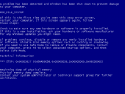
I installed SP3 on my AMD and now the computer blue screens on boot. This is a known problem.
I tried repairing the drive to no avail. I do not want to format because I have some very important documents and I dont want to risk losing them with a non-format install.
I have the drive available as an external drive and I'm able to remove some of the files. Is there anyway to add/remove the windows update from the external drive? This would solve alot of my problems.
thanks,
M
I tried repairing the drive to no avail. I do not want to format because I have some very important documents and I dont want to risk losing them with a non-format install.
I have the drive available as an external drive and I'm able to remove some of the files. Is there anyway to add/remove the windows update from the external drive? This would solve alot of my problems.
thanks,
M
Thread Starter
Better Than Canada!
Joined: Dec 2002
Posts: 10,821
Likes: 0
From: Baltimore, MD
Thread Starter
Better Than Canada!
Joined: Dec 2002
Posts: 10,821
Likes: 0
From: Baltimore, MD
If so I will try it.. But it would require reinstalling the drive internally and I want to make sure it will work... Let me research it..
Thread Starter
Better Than Canada!
Joined: Dec 2002
Posts: 10,821
Likes: 0
From: Baltimore, MD

///o\\\///o\\\
Joined: May 2002
Posts: 8,550
Likes: 0
From: Tampa
http://maliciousbrains.blogspot.com/...een-error.html
basically, looks like you boot to a cmd prompt f/ the CD, copy the bad file, replace the good file....
if this is the case, you CAN do this f/ the external HD Drive setup
basically, looks like you boot to a cmd prompt f/ the CD, copy the bad file, replace the good file....
if this is the case, you CAN do this f/ the external HD Drive setup
Thread Starter
Better Than Canada!
Joined: Dec 2002
Posts: 10,821
Likes: 0
From: Baltimore, MD