


i am trying to link two computers together and i dont know nething about computers


Thread Starter
Eagles > NFL
Joined: Jul 2003
Posts: 10,225
Likes: 0
From: nj
 i am trying to link two computers together and i dont know nething about computers
i'm trying to hook up computer#1 and computer #2 together cuz i'm reformatting computer #1 and i want to move a lot of stuff from my #1 hard drive to #2.
i've searched online and a lot of places say i need a cat5 crossover cable... whats a crossover cable? the cable i have says cat5 on it... is it what i need?
i've searched online and a lot of places say i need a cat5 crossover cable... whats a crossover cable? the cable i have says cat5 on it... is it what i need?

Joined: Jun 2001
Posts: 58,579
Likes: 0
From: Lll
a crossover cable is different from a traditional cat5 cable. they look similar, but 2 wires in the cables switch positions in the connector...but eh.
do you know how to take your hard drive out? the easiest way is to take hard drive #1, hook it up as a slave drive into computer #2. then transfer that way.
do you know how to take your hard drive out? the easiest way is to take hard drive #1, hook it up as a slave drive into computer #2. then transfer that way.
__________________
.
.
Thread Starter
Eagles > NFL
Joined: Jul 2003
Posts: 10,225
Likes: 0
From: nj
yeah, i know how to take it out.
but how do i make it a slave drive to #2? or is that easy enough for me to figure out for myself?
also, does it matter that i'm running win2000 on one and xp on the other?
but how do i make it a slave drive to #2? or is that easy enough for me to figure out for myself?
also, does it matter that i'm running win2000 on one and xp on the other?
Joined: Jun 2001
Posts: 58,579
Likes: 0
From: Lll
i think they have to be the same file system. FAT32 or NTSF.
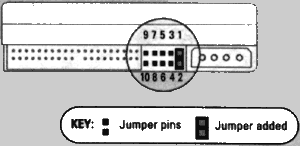
take harddrive #1 out. on the back you will see a jumper. set that jumper onto "SLAVE" directions should be on the drive somewhere on a sticker.
plug that into computer #2. use the same IDE cable as harddrive #2. but make sure its on the slave slot.
take harddrive #1 out. on the back you will see a jumper. set that jumper onto "SLAVE" directions should be on the drive somewhere on a sticker.
plug that into computer #2. use the same IDE cable as harddrive #2. but make sure its on the slave slot.
__________________
.
.

#CustomUserTitle
Joined: Mar 2002
Posts: 63,855
Likes: 1
From: glass case of emotion
you could just remove drive 2 and set it as a slave drive. remove the hard drive and look on the back of it. you'll see this little black peg in there, move it to the SL location.

Wannabe yuppie
Joined: Dec 2000
Posts: 25,918
Likes: 0
From: Madison, WI
Win2k and WinXP both use NTFS file system so it's fine to swap hard drives between them. Setting one drive as a master and one as a slave invloves flipping a couple dipswitches on the back of em. I think there's a standard configuration the switches have to be in for slave and master, and that every drive has four switches. Not sure though.

Duh
Joined: May 2002
Posts: 6,903
Likes: 0
From: Southside foo!!
look on the back of it, see the pins where it said MA = master, SL = Slave? Just replace the cap from MA to that of the SL. Some drives only require you to take the jumper (cap) off. Look for diagrams or hints on the HDD. they usually have those.
 h:
h: